


AxisCare Mobile
4.82.55K Reviews
App Specs
- Version
- 3.49.0
- Updated On
- License
- Free
- Downloads
- 500,000+
- Developer
- AxisCare
- Categories
- Business
- Platform
- Android
Screenshots
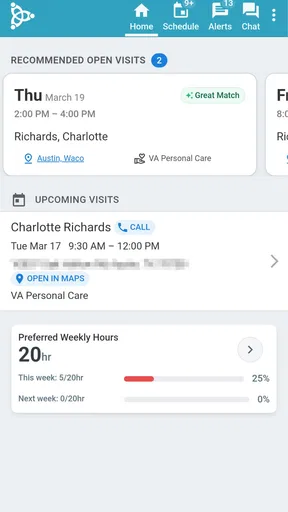
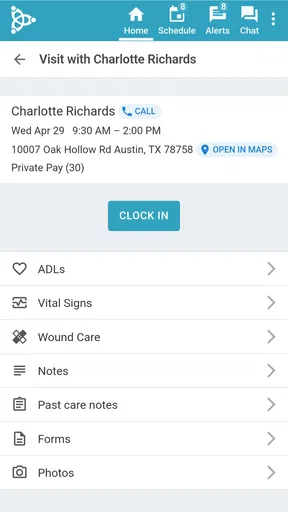
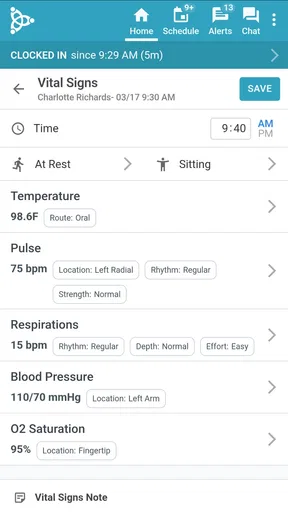
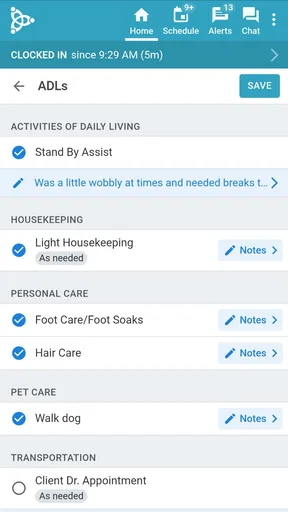

 Analysis by AppCompare
When a business app is used during a busy care day, speed and dependability matter more than a long feature list. I looked at AxisCare Mobile from that practical angle: not as a general office tool, but as an app built around the daily connection between caregivers and the administrative side of a home-care operation. It is free, rated for Everyone, and developed by AxisCare, so the entry barrier is low for teams already working with that service.
My first impression is that its value depends less on personal curiosity and more on whether your organization uses the AxisCare system. The app is not something I would install simply to manage a private calendar or track occasional errands. It makes sense when a caregiver needs a mobile way to stay connected to assigned work and when administrators need visibility beyond a desktop. In that setting, the phone becomes a practical extension of the office rather than another unrelated productivity app.
How AxisCare Mobile Holds Up During a Real Workday
I find the clearest way to judge a work app is to look at the handoffs around it, not just the moments when everything goes smoothly. This section focuses on how AxisCare Mobile fits between a caregiver’s time in the field and an administrator’s need to stay connected, including the practical limits that appear when a phone becomes part of the work routine. It also sets up a closer look at where its value comes from.
A focused approach to speed
AxisCare Mobile is currently at version 3.49.0, and that matters because a mature business app is usually judged by how quickly it gets users through routine actions. I would not expect the same instant response from every screen or every network condition, but the focused purpose works in its favor. An app designed for caregivers and administrators has a narrower job than a broad business suite, which can make the experience feel more direct when the user already knows what they need to check.
The most useful speed advantage is mental rather than purely technical. A caregiver opening a phone app during a short gap in the day does not want to navigate through unrelated dashboards, sales material, or complex project views. The AxisCare identity points toward a work-specific flow, and that focus should reduce the number of decisions between opening the app and checking the next task. For an administrator, the same principle applies when moving away from a desk and needing a mobile view of ongoing work.
There is an important qualification here: a mobile interface cannot remove the delays caused by weak connectivity, account setup, or information that has not yet been updated by the organization. I would treat the app as a convenient access point, not as a guarantee that every change will appear instantly in every circumstance. That distinction is especially important in care work, where people may be moving between homes and relying on a phone connection that is not equally strong everywhere.
What happens during heavy use
The demanding moments are not necessarily dramatic. They are the repeated transitions: checking work information before leaving, returning to the app after a call, switching between administrative duties and field work, and consulting the phone several times during a shift. A business app can feel excellent in a short demonstration and still become tiring when it is opened repeatedly. AxisCare Mobile is most convincing when it keeps those small interactions purposeful instead of making the user reconstruct the whole workday each time.
Worth Reading Before You Choose

EA SPORTS FC Mobile 26 Is a Bigger Football Game, but It Takes Time

Flipboard Shows What News Apps Must Do Beyond the Feed

Switching to Android Auto Means Rethinking Your Driving Routine

Google Calendar Makes a Crowded Week Easier to Manage

Ludo King Makes the Most of the Minutes Between Plans

Baby Panda World Brings Quick Play to Modern Phones, but Its Game Library Feels Busy
For a caregiver, a realistic scenario might begin with a morning check of the day’s responsibilities, followed by a quick return to the app between visits. The benefit is not entertainment or broad customization; it is having a work-oriented mobile channel available when carrying a laptop would be awkward. If an administrator is away from the main office, the same mobile access can be useful for keeping up with the operational side of care rather than waiting until returning to a desktop.
Heavy use also exposes the app’s likely trade-off. A phone screen is convenient, but it is not as comfortable as a large monitor for reviewing a lot of information at once. I would use the mobile app for focused checks and immediate work rather than expecting it to replace every desktop workflow. That is a meaningful distinction for supervisors who spend long periods comparing schedules, reviewing records, or handling several administrative decisions together.
Stability and recovery matter more than polish
For this kind of tool, reliability means more than avoiding crashes. It means being able to return to the app after an interruption and understand where the work stands. Calls, messages, doorways, low battery, and movement between locations are normal parts of a caregiver’s day. I value an app more when it supports a simple recovery habit: reopen it, orient yourself quickly, and continue without guessing whether the previous screen still reflects the current situation.
I would still avoid treating any mobile business app as the only record of important work. A sensible routine is to pause before leaving a screen, confirm that an action has completed, and reopen the relevant area after a connection interruption. That is not a criticism unique to AxisCare Mobile; it is good practice whenever a phone is being used for operational information. The app can be a strong companion, but the organization’s procedures remain important.
The app’s broad adoption also gives it a reassuring context. It has passed half a million installs and carries an average rating of 4.8 from roughly twenty-one thousand ratings, with about two and a half thousand written reviews. Those figures do not prove that every caregiver will have a flawless experience, but they suggest that the product is established rather than experimental. I read that as a reason to take it seriously, while still remembering that business-app satisfaction often depends on how well the employer’s setup matches the user’s needs.
Device limits and practical demands
AxisCare Mobile supports Android devices running version 9 or later. That is a useful compatibility boundary to check before asking a whole team to adopt it. Newer phones should be the natural target, but organizations with older devices need to confirm that the hardware and operating system are suitable before making the app part of a daily workflow. A compatible operating system is only the starting point; screen size, battery condition, storage pressure, and network quality can all change how comfortable a mobile work tool feels.
Resource demands are best judged by the role the app plays. Because it is a focused business app rather than a game or media-heavy service, I would expect its main burden to come from repeated use, connectivity, and the surrounding phone environment rather than from demanding graphics. Still, a caregiver who spends the day on a tired battery should avoid assuming that every installed app is harmless. Keeping the phone charged, closing genuinely unnecessary background activity, and updating the device responsibly are sensible steps when the phone is part of the job.
Small screens create a different limitation. A compact phone is excellent for quick checks while standing or moving, but less pleasant for entering or reviewing a large amount of information. I would favor a larger phone for staff who rely on mobile access throughout the day, while keeping a desktop workflow for detailed administrative sessions. This is one of the clearest cases where another option is better: the office interface is likely the more comfortable choice for extended review, even when the mobile app is the better choice for immediate access.
Where the app fits better than usual alternatives
The usual alternative for a caregiver is a mixture of phone calls, text messages, paper notes, personal calendar entries, and occasional desktop access. That mixture can work in a small operation, but it spreads information across tools and makes consistency harder. AxisCare Mobile is more appealing because it is tied to a care-business workflow instead of asking each person to invent a private system. The advantage is coordination, not simply the presence of an app icon.
Compared with a generic calendar, it should be considered for its connection to the organization’s operational process rather than its ability to display dates. A calendar may be easier for personal reminders, but it does not replace a work-specific channel. Compared with a general team-chat app, AxisCare Mobile is a better fit when the goal is structured access to care-related work rather than informal conversation. Conversely, a generic tool may be preferable for a business that does not use AxisCare or that needs broad project management outside home care.
This is also why I would not recommend downloading it first and trying to build a business around it independently. The app’s usefulness is tied to the AxisCare environment and to the roles of caregivers and administrators. If you are a private caregiver without an organization using the platform, a simpler scheduling or notes app may be less confusing. If you run a different kind of business, the specialized focus may feel restrictive rather than helpful.
Three habits that make mobile use smoother
My first practical tip is to separate quick mobile work from deep review. Use the phone when you need immediate access while away from a desk, then reserve a larger screen for tasks that require comparison or extended reading. This avoids turning the app’s portability into a substitute for every administrative tool and reduces the frustration caused by trying to fit office-scale work onto a small display.
Second, build a deliberate recovery check into the day. After moving through an area with unreliable service or after an interruption, reopen the app and confirm the current state before relying on what you remember seeing earlier. The useful insight here is that recovery is part of reliability: even a stable app cannot make an interrupted connection behave like a continuous one.
Third, test the workflow on the least comfortable device your team actually uses. A manager may evaluate the app on a recent phone and overlook the experience of staff using older hardware, smaller screens, or weaker batteries. Since Android 9 is the minimum operating system, compatibility should be checked across the real device mix rather than assumed from one successful installation. This kind of trial can reveal whether the app is genuinely practical for everyone who needs it.
Who should choose it, and who should pass
I would recommend AxisCare Mobile to caregivers who need a mobile connection to their organization’s work and to administrators who cannot remain at a desk all day. It is especially suitable for teams that want one specialized channel instead of asking staff to coordinate through scattered personal tools. The free price also makes initial access easier, although the real decision is whether the organization’s existing AxisCare setup supports the intended workflow.
I would be more cautious for someone looking for a standalone personal planner, a general invoicing tool, or a universal employee-management app. The category is business, but that does not mean it covers every business need. Its specialized purpose is a strength for the right care team and a limitation for everyone else. I would also hesitate to make it the sole choice for staff who do almost all their work at a desktop, because the mobile advantage matters less when portability is not part of the job.
The age rating of Everyone makes it broadly suitable from a content perspective, but that should not be confused with suitability for every professional role. A product can be accessible in rating terms and still require organizational training, correct account access, and clear procedures. In practice, those human factors will shape the experience as much as the phone itself.
My performance verdict
After looking at AxisCare Mobile as a working tool rather than a simple download, I see a focused companion for caregivers and administrators who already belong to an AxisCare-based operation. Its strongest qualities are the convenience of mobile access, the specialized business context, and the potential to reduce dependence on scattered everyday alternatives. Its performance story is less about flashy speed and more about getting to relevant work without carrying the whole office around.
The limitations are equally clear. A small phone is not ideal for lengthy administrative sessions, connectivity can affect any mobile workflow, and the app is not a sensible standalone choice for people outside its intended environment. I would also keep a careful habit of checking that important actions or updates have completed after interruptions, especially when moving through areas with inconsistent service.
Released on May 11, 2016, and still maintained at version 3.49.0, the app has had time to become a recognizable part of its category. For the right team, the real benefit is dependable access to care work when the desk is out of reach. I would choose it for mobile continuity, not for replacing every desktop task. If that matches your day, AxisCare Mobile is a sensible free app to consider; if you need a broad personal organizer or an unrelated business platform, a different tool will likely serve you better.
Pros
- Quickly access client schedules
- notes
- and care plans on the go.
- Mobile clock-in and clock-out features support accurate visit tracking.
- Caregivers can document tasks and observations immediately after visits.
- Secure messaging helps staff communicate with office teams efficiently.
- Works well for agencies already using the AxisCare management platform.
Cons
- Requires an AxisCare agency account; it is not useful as a standalone app.
- Some features may depend on the permissions assigned by your agency.
- Performance can vary with weak mobile data or unreliable Wi-Fi connections.
- Frequent documentation may feel time-consuming on smaller phone screens.
- Battery and location use may increase during GPS-based visit tracking.
FAQs for AxisCare Mobile
What is AxisCare Mobile used for?
AxisCare Mobile is designed for home care agencies and their field caregivers. It helps staff view schedules, access client and care information, review tasks, document visits, record notes, and communicate updates with the office. The app is mainly a companion to the AxisCare agency management platform, so its usefulness depends on whether the caregiver’s organization has an active AxisCare account and has enabled the relevant mobile features.
Can caregivers use AxisCare Mobile without an agency account?
No. AxisCare Mobile is not generally intended to function as an independent personal care-planning or scheduling app. Caregivers normally need login credentials supplied by an agency that uses AxisCare, and access may be limited according to the user’s role and permissions. Before downloading, confirm that your employer or care organization supports the mobile application and has provided the correct sign-in details.
What can caregivers do during a client visit?
Depending on the agency’s configuration, caregivers can use AxisCare Mobile to review assigned shifts, see client details and care instructions, check scheduled tasks, clock in or out, and submit visit documentation. They may also be able to add notes, report changes, and complete required forms. Available tools can vary by account settings, location, device permissions, and the version of the app.
Does AxisCare Mobile require an internet connection?
An internet connection is normally needed to sign in, synchronize schedules, send documentation, and receive the latest information from the agency. Some functions may remain available temporarily when connectivity is weak or unavailable, but users should not assume that every feature works offline. After working without a reliable connection, it is important to reopen or synchronize the app and verify that submitted information reached the office.
Is AxisCare Mobile safe for handling sensitive client information?
AxisCare Mobile is built for professional home care operations, where protecting client and visit information is essential. However, security also depends on how the agency manages accounts and how caregivers use their devices. Use a strong, private password, enable device security, avoid sharing login details, install updates from official stores, and do not save or disclose client information unnecessarily. Employers should also provide their own privacy and compliance instructions.


